 |
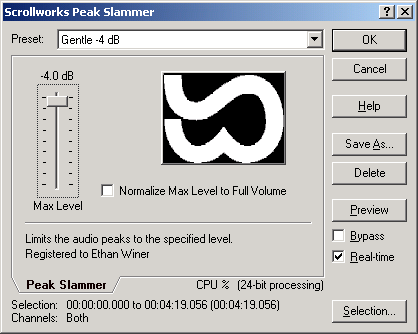
| Figure 1: With only one slider and one check box, using Peak Slammer couldn't be easier. Simply set the Max Level slider to the loudest allowable volume, then click OK. |
| www.ethanwiner.com - since 1997 |
Peak Slammer
Make your tracks louder without compressing the life out of them
By Ethan Winer
(This article first appeared in the September 2004 issue of EQ Magazine.)
Everyone knows about the infamous "Loudness Wars," where every CD tries to compete with every other CD based on sheer volume alone. Mastering engineers hate being asked to make CDs as loud as possible for good reason - it sucks all the life from the music and is annoying to listen to.
|
| Figure 1: With only one slider and one check box, using Peak Slammer couldn't be easier. Simply set the Max Level slider to the loudest allowable volume, then click OK. |
The usual way to make tracks loud is with compression, either standard or multi-band. But over-compression reduces the dynamic range to zero and adds nasty artifacts. Cymbals swell and fade unnaturally; vocals sound overly breathy; and after only a few minutes, most listeners are lunging for the Stop button. There's got to be a better way to make tracks louder but without harming the music, and there is - Peak Slammer from Scrollworks.
This unassuming little plug-in (Windows, DirectX only) does one thing and does it very well: It increases the volume of a track with minimal artifacts. I regularly achieve a 4 to 6 dB increase in level without any audible side effects. Depending on the type of music and how it's recorded, you may be able to achieve even more of a level increase. And with only one parameter to adjust, using Peak Slammer effectively is a no-brainer.
Unlike limiting that raises and lowers the volume over time, Peak Slammer operates on individual cycles. You specify the loudest allowable level, and Peak Slammer reduces the volume for only those cycles that exceed the threshold. On the surface this may sound like traditional limiting, but it's not because the change is immediate and lasts for the length of that one cycle only.
I use Peak Slammer when finalizing mixed tracks in SoundForge, just before normalizing or setting the final volume manually. You can do the following steps in most stereo editor programs that host DirectX effects. First, scan the file to identify the loudest point and note that level. Let's say the loudest point is at -6 dB. Now insert Peak Slammer and set the slider to 4 dB lower, or -10 dB. After processing, no parts of the track will exceed -10 dB, so you can then normalize or raise the volume manually to obtain the final level.
Peak Slammer does offer a check box option to normalize to maximum automatically. But I never use that feature because some CD players distort when presented with full-scale levels. So I always normalize manually to -1.0 dB instead of 0.0.
Added January 15, 2016: It seems Scrollworks is no longer in business, but I'll leave this review online because it's still educational. See the additional explanations below.
Peak Slammer
Type: DirectX plug-in
Platform: Windows 95 through XP
Price: $39.95
Contact: www.scrollworks.com/products/
Copy Protection: Serial number only
Version reviewed: 1.0
Demo: Downloadable
Strengths: Works as advertised
Limitations: Normalizing below maximum would be useful
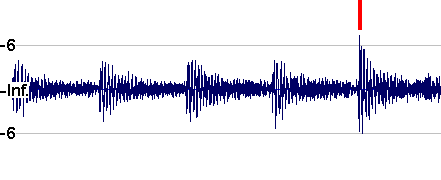
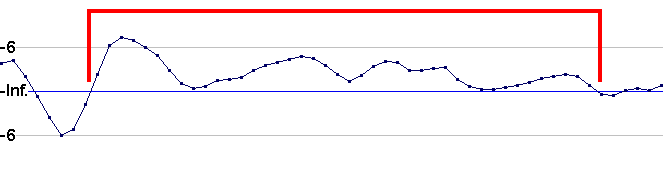
Added June 15, 2008: To clarify what Peak Slammer does (and how you could do the same manually), I copied two screens from Sound Forge, the audio editor program I use. The first image below shows part of a tune where a loud snare hit (red line) is louder than the adjacent beats. This prevents normalizing from making the rest of the track louder. The second image zooms in and shows just the one loud beat. I zoomed in enough so you can see the individual samples, shown by Sound Forge with small dots.
After telling Peak Slammer to allow no level higher than -6 dB, the range bounded by red was reduced so the loudest part just hits -6 dB. Note that the bounded area is defined by zero crossings. So the volume is reduced within that range only, for the duration of the burst that exceeds the threshold.
Entire contents of this web site Copyright © 1997- by Ethan Winer. All rights reserved.